
Download MLayout – PDF/XML Desktop Publishing Tool for Mac
Overview
MLayout is a dedicated PDF/XML‑based desktop publishing application designed exclusively for macOS. First released in the early 2000s and still praised for its lightweight footprint, MLayout targets designers, photographers, and print professionals who need a fast, secure tool for creating page‑perfect layouts without the bloat of larger suites. The current version, 2.13, was last updated on January 13 2006, but the trial version remains fully functional for evaluating the core features before committing to a purchase.
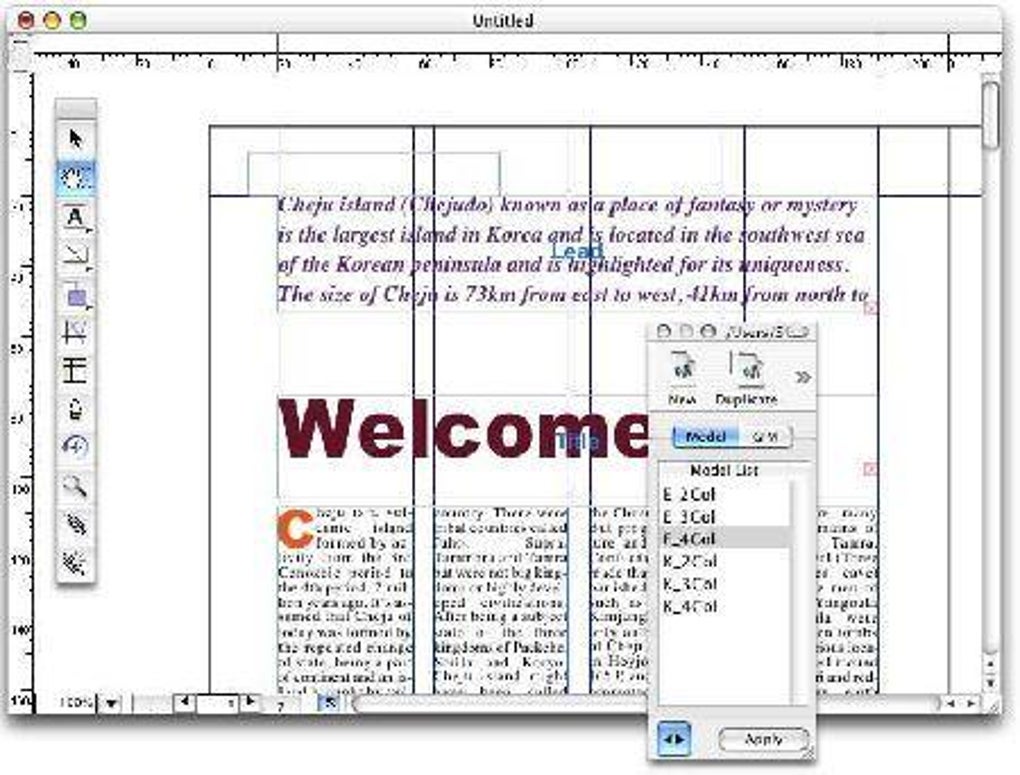
Because the software is built for the Mac ecosystem, it integrates naturally with macOS file handling, supporting drag‑and‑drop of PDFs, XML data imports, and high‑resolution preview rendering. Its user interface follows classic Mac design principles: clean menus, intuitive panels, and a focus on speed over unnecessary visual effects. Whether you’re assembling a product catalog, a photo book, or a complex multi‑page brochure, MLayout offers a reliable, no‑frills environment that lets you concentrate on design rather than learning a steep learning curve.
The app is distributed in English only and can be downloaded directly from the developer’s site or reputable software repositories. While the program is not actively maintained, it continues to attract a niche audience that values its minimal disk space requirement and straightforward workflow, making it an appealing option for those looking for a free‑to‑try, secure desktop publishing solution on macOS.
Key Features of MLayout
- PDF‑Native Editing: Open, edit, and re‑export PDF files without losing vector quality or embedded fonts.
- XML Data Integration: Import XML data streams to automatically populate templates, ideal for catalogs and reports.
- Lightweight Architecture: Requires less than 50 MB of disk space, making it perfect for older Mac machines.
- High‑Resolution Preview: Real‑time zoom and page‑turning for accurate print‑ready visualisation.
- Drag‑and‑Drop Layout: Seamlessly move images, text blocks, and shapes across pages with the macOS drag‑and‑drop paradigm.
- Layered Page Management: Organise content on multiple layers, allowing precise control over overlapping elements.
- Export Options: Save final projects as PDF, high‑resolution TIFF, or print‑ready PostScript files.
- Customizable Styles: Create and reuse paragraph, character, and object styles for consistent branding.
- Secure Trial Mode: The trial version disables only the final export watermark, ensuring a genuine test experience.
- Mac‑Optimised UI: Native macOS menus, keyboard shortcuts, and Retina‑ready graphics.
Installation, Usage, and Compatibility
Step‑by‑step installation: Begin by downloading the MLayout trial installer from the official site. The file arrives as a compressed .dmg package, which you open by double‑clicking. Drag the MLayout icon into your /Applications folder, then launch the app from Launchpad or the Applications directory. macOS will prompt you to confirm that you trust the developer; click “Open” to proceed. The installation process takes under a minute on most modern Macs because the application’s footprint is exceptionally small.
First‑time setup: Upon launching MLayout, you’ll be greeted with a welcome dialog offering a quick tour of the interface. Accept the default workspace layout, which positions the toolbar at the top, the layers panel on the right, and the document canvas in the centre. You can later customise the workspace via View → Workspace to suit personal preferences.
Working with PDFs and XML: To start a new project, choose File → New → From PDF or From XML. The program parses the source file, creating editable frames for each page. You can then add text boxes, image placeholders, and vector shapes using the toolbar. For XML imports, map XML tags to layout fields through the Data Mapping window, allowing automatic population of product listings, price tables, or any structured data set.
Saving and exporting: During the trial, you can save your work as an MLayout project (.mlp) without restriction. Exporting to a final PDF adds a small “Trial Version” watermark, which is removed after purchasing a full license. Export settings include DPI control, colour profile selection, and bleed options for professional printing.
Compatibility: MLayout runs on macOS 10.4 (Tiger) and later, including macOS 10.15 (Catalina) and macOS 12 (Monterey). The software is fully compatible with both Intel‑based Macs and Apple Silicon (M1/M2) via Rosetta 2 translation, ensuring smooth performance on newer hardware despite its legacy codebase. Because it is a macOS‑only application, Windows, Linux, Android, and iOS users will need to consider alternative desktop publishing tools.
Pros, Cons, Frequently Asked Questions & Final Thoughts
Pros
- Extremely lightweight – occupies minimal disk space and memory.
- Native PDF editing eliminates the need for external converters.
- XML data integration streamlines the creation of data‑driven documents.
- Intuitive macOS‑styled interface reduces the learning curve.
- Free trial provides a genuine hands‑on experience before purchase.
Cons
- Last official update was in 2006, so modern macOS features may be missing.
- No native Windows or Linux version limits cross‑platform collaboration.
- Trial version adds a watermark on exported PDFs.
- Limited support resources; community forums are sparse.
- Advanced typographic controls (e.g., OpenType features) are not as robust as larger suites.
Frequently Asked Questions
Is MLayout still safe to download despite its age?
Yes. The installer is digitally signed by the original developer, and because the application is sandboxed by macOS, it does not pose a security risk. Always download from the official site or a trusted repository.
Can I import other file formats besides PDF and XML?
MLayout primarily supports PDF and XML. However, you can place image files (JPEG, PNG, TIFF) within the layout as graphic objects.
Will the trial version work on macOS Monterey?
Yes. The app runs under Rosetta 2 on Apple Silicon and is fully compatible with macOS 12 Monterey, though some newer system APIs are not utilised.
How does the licensing work after the trial?
A one‑time purchase unlocks the full version, removes the export watermark, and provides a license key that is stored in the macOS keychain.
Is there any customer support available?
Support is limited to email correspondence with the developer. Response times may vary due to the product’s legacy status.
Conclusion – Should You Download MLayout?
If you are a macOS user seeking a no‑frills, lightweight desktop publishing solution that handles PDF and XML with ease, MLayout still offers a compelling value proposition. Its free trial lets you explore the core workflow without financial commitment, and the low system requirements mean even older Macs can run it smoothly. While the lack of recent updates and the absence of a Windows version may deter some, the core functionality remains solid for simple catalogues, photo books, and data‑driven reports. For professionals who need advanced typographic features or cross‑platform collaboration, modern alternatives like Adobe InDesign or Affinity Publisher might be a better fit. However, for hobbyists, small businesses, or anyone needing a secure, fast, and affordable tool to publish PDFs on a Mac, downloading MLayout today is a smart, risk‑free decision.







